Train matchers
The purpose of the Train Matchers is to select a subset of the trains, for example: the trains to highlight in the graphical timetable, the trains a driving policy is applied to, the trains to simulate in a groovy script, or the trains on which to apply a timetable transformation.
You can select:
- All trains, with
any - A train directly by its train number
- A list of trains listing their train numbers
- Trais matching a logical expression, based on their properties. The pattern of these matchers generally is
<train property> <operator> <value>.
The comparison operators for strings, numeric, date or time properties include: >, <, >=, <=, ==, and !=. For easier embedding of expressions inside XML documents (for example, Driving policy documents, Timetable transformation documents), these operators are aliased with the mnemonic comparison operators: gt (greater than), lt (less than), le (less than or equal to), ge (greater than or equal to), eq (equal to), neq (not equal to). Furthermore, is and is not are aliases for == and !=.
To match a single-valued property agains a list of values, use the in or the not in operators; to match any value of a list-valued property against a given value use the contain operator, or its alias contains. The following sections explain the meaning of each available property, and provide an example of their use.
When a train number, station name, category name etc. contain spaces or special characters, it must be double quoted. Special characters are all symbols except underscore, hash (#), minus, plus, dot, at (@).
Train numbers
Single train number
2G03_875
List of train numbers
Comma-separated list of train numbers
2G03_875, 2D06_874
Space-separated list of train numbers
2G03_875
2D06_874
One train number per row
2G03_875
2D06_874
Trains
Train number, station names, categories, collections and other string values can be compared using the equal sign, the 'is' keyword, or their negated forms, '!=' and 'is not'; additionally, a name can be compared with a list of values using the 'in' and 'not in' keywords. The contain or contains operator allow searching inside collection-valued attributes, like trainset engines, service codes, diagram, etc.
Numeric values and durations can be compared with the equal sign, greater than, less than, and not equal.
Train number
train number = 2G03_875
train number == 2G03_875
train number is 2G03_875
train number != 2G03_875
train number is not 2G03_875
Train designators
Trains imported from TrenoLive, in addition to the train number, have also additional numbers called designators that identity that train in external systems, interfaces, interchange file formats, etc. Designators are assigned to trains by registers, according to the RailML nomenclature. The following example matches all trains with the designator equal to 1A11AA assigned by the 'Schedule ID' register.
designator 'Schedule ID' = 1A11AA
Please note that register and designators containing a space must be quoted.
Category
category = EE
category in (EE, XX)
Collection
If the name of the collection contains spaces or punctuation marks, the string must be enclosed it in double quotes.
collection = Default
collection = "Simulation Dec 2020"
Operator
If the name of the operator contains spaces or punctuation marks, the string must be enclosed it in double quotes.
operator = SW
operator = "South Western Trains"
operator not in (SW, WM)
operator not in ("South Western Trains", "West Midlands Trains")
Service class
The service class is the first digit or letter of the train number.
service class = 1
service class not in (1, 2)
Planned departure time from origin / planned arrival time at destination
arrival time < 07:00:00
departure time > 08:00:00
arrival time between 11:00:00 and 12:30:00
departure time between 23:00:00 and 02:30:00
Origin and Destination stations
The station code of the origin or destination of trains.
origin = LIVST
origin not in (LIVST, SHENFLD)
destination = SHENFLD
destination not in (LIVST, SHENFLD)
Intermediate stations
The short code of the station must be used.
running through LIVST
Train Bundle
The trains can be grouped in bundles, and bundles are grouped into folders. Each bundle has a name property and a folder property. All the bundles in the WATRLMN folder:
bundle folder = "WATRLMN"
The following expressions have the same meaning; please note the bundle property that combine both folder and name in a single property.
bundle folder = "WATRLMN" and bundle name = "DEP_WL"
bundle = "WATRLMN/DEP_WL"
Passenger / Freight trains
Both empty coaching stock and passenger revenue services:
passenger
Both empty stock and freight revenue services:
freight
Both passenger and freight trains in revenue services:
revenue
Empty coaching stock or freight wagons:
empty
Passenger trains in revenue service:
passenger and revenue
Trainset / rolling stock / timing load
Since a train can use different trainsets or timing loads during its voyage (for example due to attach/detach activities), these matchers look for the name of any of the trainset.
EMUD in trainsets
trainsets contain EMUD
If you expect the trainset to be unique across all train voyage, there are more matchers available:
trainset parts > 2 /* any train with more than 2 units */
trainset length > 250 m /* any train longer than 250 meters */
trainset weight < 1600 t /* any train lighter than 1600 tons, with the configured net weight percentage */
trainset net weight > 250 t /* any train with more than 250 t of payload, at full load */
trainset gross weight < 1600 t /* any train lighter than 1600 tons at full load */
trainset tare weight < 600 t /* any train lighter than 600 tons when empty */
trainset maximum speed > 200 mph /* any train faster than 200 mph */
trainset name = 'EMUD' /* any EMUD */
trainset capabilities contains 'ETCS L2' /* any train able to run on ETCS L2 signalling */
trainset engines contains 'E464' /* any train hauled by a E464 engine */
The trainset weight attribute is the actual weight of the trainset, as simulated. gross weight, net weight and tare weight are the nominal weights at full load, i.e. 100% passengers or goods capacity. For simplified trainsets, i.e. one or more engines followed by a trailer, gross weight, tare weight and weight are the same, because the net weight is always zero.
Diagram
Will match all the trains sharing the same diagram of the given train number.
5F98 in diagram
diagram contains 5F98
Service code
When a train uses different service codes during its voyage, you can use the in operator to look for any of the service codes.
88102390 in service codes
service codes contain 88102390
To search for trains using a single service code in the whole voyage, you can also use the equal operator.
service code = 88102390
Operating period
The only supported date format is yyyy-mm-dd.
2020-05-22 in operating period
Running time
Total running time of the train, including stops. Like for all the others conditions based on durations, there are a few time formats supported:
- hh:mm:ss
- mm:ss
- descriptive duration, like 2 hours, 150 minutes, 30 seconds
- number of seconds
running time > 01:05:30
running time > 65:00
running time > 2 hours
running time > 120 minutes
running time > 7200 seconds
running time > 7200
The comparison operators for durations include: >, <, >=, <=, ==, and !=.
Path entries
These properties are not bound to the train, but to each entry of its timetable. A matcher on a path entry property is made of two parts: the expression itself, in the usual form <train property> <operator> <value>, and a scope specifier, that select on which entry the expression is evaluated. The following section lists the available scope specifiers.
First entry at the station with the specified code:
<expression> at LIVST
<expression> not in (LIVST, BOWJ)
Nth entry at the station with the specified code; for example, on a loop train, the first and the second entries at LIVST:
<expression> at LIVST#1
<expression> at LIVST#2
Origin or destination entry:
<expression> at origin
<expression> at destination
Two entries, in the given order. Will match only if both expressions are true and they occur in the right order.
<expression> at LIVST then <expression> at SHENFLD
The previous / next entry / stop / pass / arrival / departure / station track / station stop from the specified station.
stopmatches both intermediate stops and origin or destination entries.arrivalmatches intermedia stops or destination entries.departurematches origin entries or intermediate stops.station trackmatches any entry at a station track, i.e. a track with a name, belonging to a station. In Treno v3.2, only Stations may have named track, Junction, Halts or other kind of control points have only unnamed tracks. From a microscopic perspective, Station tracks are marked by a Station track joint. Unnamed tracks may only have Station reference joints.station stopmatches a stop on a station track.
<expression> at previous stop from LIVST
<expression> at next pass from LIVST
The properties of path entries, for planned trains, are listed below.
Entry type
Possible entry types are: Stop, Pass, Turnback, ServiceStop, SetDownOnly, PickUpOnly, RequestStop.
type = Turnback at SHENFLD
To write expression more fluently, there are some aliases available. To match any stop entry type (Stop, Turnback, ServiceStop, SetDownOnly, PickUpOnly, RequestStop):
stopping at SHENFLD
To match only revenue stops of passenger trains, use calling.
Calling
Describing a passenger train stopping at a station to allow passengers to alight or board.
calling at SHENFLD
Non stopping trains:
passing through SHENFLD
Intermediate stop or destination:
arriving at SHENFLD
Origin or intermediate stop:
departing from SHENFLD
Turnback
turnback at SHENFLD
Planned time
arrival time < 07:00:00 at SHENFLD
departure time > 08:00:00 at LIVST
arrival time between 11:00:00 and 12:30:00 at LIVST
departure time between 23:00:00 and 02:30:00 from LIVST
Stop time
The planned stop time.
stop time < 03:30 at SHENFLD
Station name
It's only useful combined with the previous / next entries. This expression selects train that stop at ILFORD, the run non-stop towards SHENFLD:
station = ILFORD at previous stop from SHENFLD
Station type
It's only useful combined with the previous / next entries. Possible station types are: Station, Junction, Halt, Other. This expression selects train that stop at a Halt, the run non-stop towards SHENFLD:
station type = Halt at previous stop from SHENFLD
Station load factor
The Station Load Factors are defined in Treno, and imported to Trenissimo using the Import Macro from Treno action.
station load factor = HBF at destination
Station group
The Station Groups are defined in Treno, and imported to Trenissimo using the Import Macro from Treno action.
station group = Holdeplass at origin
Station track
station track = 7 at SHENFLD
Line or line track
inbound line = EL at ILFORD
inbound line track = EL/Down at ILFORD
inbound line not in (EL, ML)
outbound line = ML at ILFORD
outbound line track = ML/Up at ILFORD
outbound line not in (EL, ML)
Trainset name
The trainset of the train arriving or leaving . Outboud is implied when direction is not specified.
outbound trainset = 345 at LIVST
inbound trainset not in (EMU390, EMU370) at GIDEAPK
Trainset length
The supported measure units are m (meter) and yd (yard). Outboud is implied when direction is not specified.
trainset length > 120 m at LIVST
outbound trainset length > 120 m at LIVST
inbound trainset length > 120 m at ILFORD
Other trainset properties
trainset maximum speed > 200 km/h at ILFORD
trainset parts >= 3 at ILFORD
trainset speed type = MU at ILFORD
outbound trainset engines contains EMU390 at ILFORD
inbound trainset name = "EMU390/3" at ILFORD
inbound trainset with TPWS
Peak hour
peak hour at ILFORD
Trainset change
trainset change at ILFORD
Connection
In Treno and Trenissimo, connections are attach, detach and turnaround activities.
connection at ILFORD
Interpolation
Treno planning tool can automatically interpolate missing passing times, when importing timetables from other systems or tools.
not interpolated at ILFORD
Path segments
A path segment is the portion of the train path between two given stations. The general form of expression involving segments is: <expression> between <station> and <station>.
Stations
Any trains running between two station.
running between LIVST and SHENFLD
Running time
The planned running time, that is the arrival time at the end of the segment minus the departure time from the beginning of the segment.
running time > 30:00 between LIVST and SHENFLD
Line
The name of the line the train is running on.
line = EL between LIVST and SHENFLD
If the train changes line in between, any of the lines can be matched.
EL in lines between LIVST and SHENFLD
line not in (EL, ML) between ILFD and GIDEAPK
Or all of them, in the specified order.
line = EL,ML between LIVST and SHENFLD
Trainset name
The trainset used on the segment.
trainset = 345 between LIVST and SHENFLD
trainset not in (EMU390, EMU370) between ILFD and GIDEAPK
Other trainset properties:
trainset length < 200 between LIVST and SHENFLD
trainset weight > 1200 t between LIVST and SHENFLD
trainset maximum speed > 200 km/h between LIVST and SHENFLD
trainset parts >= 3 between LIVST and SHENFLD
trainset speed type = MU between LIVST and SHENFLD
trainset engines contain EMU390 between LIVST and SHENFLD
No stop train
A train is no stop if it calls at the beginning and at the end of the segment, without any other intermediate stop:
no stop between LIVST and SHENFLD
At least one stop in the segment
The stop entry can be at the beginning, at the end or at any of the intermediate locations of the segments.
calling between LIVST and SHENFLD
To consider only passenger train stopping at a station to allow passengers to alight or board, use calling.
stopping between LIVST and SHENFLD
Service code
service code = 88102390 between LIVST and SHENFLD
Actual trains
In addition to the expressions available for the trains of the planned timetable, there are other properties only available in the context of a running simulation: in the graphical timetable, in the processing of simulation results from a groovy script, etc.
Some expressions involving delays require a train to be already arrived at, or departed from a given station, or its origin, or destination. If not, the expression won't be evaluated, i.e. will return neither true nor false. In the context of the graphical timetable, for example, the delay at destination expression won't highlight any train not arrived at destination, either if the criteria is equal or not equal, greater than or less then. However, if two expressions are combined with the or boolean operator, and one of them can be evaluated, the whole expression will evaluate. For example the following expression will be evaluated even if the train has not arrived yet, because the second part of the or expression can always be evaluated. It will select all trains belonging to the LM operator, plus the train already arrived at destination with a delay greater than 3 minutes.
delay > 03:00 at destination or operator = LM
Train date
For multi-day simulations, this expression matches only one course per train number
date = 2020-05-25 and train number = 2G03_875
Trains already departed from their origin
departed from origin
As a shorthand:
departed
Trains arrived at their destination
arrived at destination
As a shorthand:
arrived
Current trainset
Trainset currenly in use by a running train. Is the train is already arrived at destination, the current trainset is the inbound trainset at destination.
current trainset length > 250 m /* any train longer than 250 meters */
current trainset weight < 1600 t /* any train lighter than 1600 tons */
current trainset maximum speed > 200 mph /* any train faster than 200 mph */
current trainset with TPWS /* any train with TPWS available */
Current delay
Valid only for trains already departed from their origin.
delay > 03:30 /* the last known delay of the train is greater than 3 minutes and 30 seconds */
Delay at origin
Valid only for trains already departed from their origin. The following expressions are equivalent:
delay at origin > 03:30
delay > 03:30 at origin
Delay at destination
Valid only for trains already arrived at their destination. The following expressions are equivalent:
delay at destination > 03:30
delay > 03:30 at destination
Maximum / minimum delay
Valid only for trains already departed from their origin. The delays are calculated only at non-interpolated timing points. The expression supports both positive and negative values.
max delay > 03:30
min delay < -01:30
Actual path entries
Arrived
The train has already arrived at the station.
arrived at LIVST
Departed
The train has already left the station.
departed from LIVST
Stopped at station
The train is currently stopped at the station.
stopped at LIVST
Delay
The arrival or departure or passing delay at the specified entry. The train must be at least arrived at the station, otherwise this expression won't be applied. delay > 01:30 at LIVST
Arrival delay
The arrival delay at the specified entry. Valid only it the train is already arrived at that station.
arrival delay > 01:30 at LIVST
Departure delay
The departure delay at the specified entry. Valid only it the train is already departed from that station.
departure delay > 01:30 at LIVST
Estimated arrival delay
The estimated arrival delay at the specified entry. Valid only for trains already departed from their origin.
estimated arrival delay > 01:30 at LIVST
Estimated departure delay
The estimated departure delay at the specified entry. Valid only for trains already departed from their origin.
estimated departure delay > 01:30 at LIVST
Dwell time delay
The dwell time delay at the specified entry. Valid only if the train is already departed from that station. The following expressions are equivalent:
dwell time delay > 01:30 at LIVST
stop time delay > 01:30 at LIVST
Past or upcoming entries
Running trains know where, along their scheduled path, they are currently at (i.e. stopped at a station, or running towards a station). This allows to select past or upcoming entries and evaluate expression over them. For example, to limit a performance override signal to trains that stop at the station right after the signal you can use stopping at upcoming entry at XXX. The upcoming matcher ensure that only the next entry at XXX is checked, even if the train stop at XXX multiple times, or it already stopped at XXX. You can't get this behavior with at because it does not take into account the current position of the train, as is evaluated in the context of the scheduled train, not the one of the running train.
Similarly, you can use past to refer to the previous entry; for example, to limit a performance reset signal to trains that have just stopped at the station right before the signal you can use stopping at past entry at XXX.
Actual path segments
Actual running time
The time span between the actual departure time from the first station of the segment and the actual arrival time at the last station. Valid only it the train is already arrived at the end of the segment.
actual running time > 25:30 between LIVST and SHENFLD
Running time delay
The difference between the planned running time on the segment and the actual running time. Valid only it the train is already arrived at the end of the segment.
running time delay > 01:30 between LIVST and SHENFLD
Logical expressions
Expressions can be combined using the or, and operators, and negated using the not operator. Such composite expressions may have some caveats when used on the actual timetables.
Expressions involving trains
Any expression on planned trains can be combined using the boolean operators; no special care is required. Here some examples:
stop time < 03:30 at SHENFLD and destination = LIVST
operator = LM or category = XX
not (operator = LM or category = XX)
operator != LM and category != XX
Expressions involving timetable entries
To prevent ambiguity, it's advisable to surround the expression in parentheses.
(stop time < 03:30 and station track = 2) at SHENFLD
(arrived and delay > 01:00) at SHENFLD
Please note that the second expression, without parentheses, is ambiguous:
arrived and delay > 01:00 at SHENFLD
There are two syntactically correct interpretations of this expression:
- The train has arrived at its destination, and the delay at SHENFLD is greater than 1 minute
(arrived) and (delay > 01:00 at SHENFLD) - The train has arrived at SHENFLD, and the delay is greater than 1 minute there
(arrived and delay > 01:00) at SHENFLD
Expressions involving delays
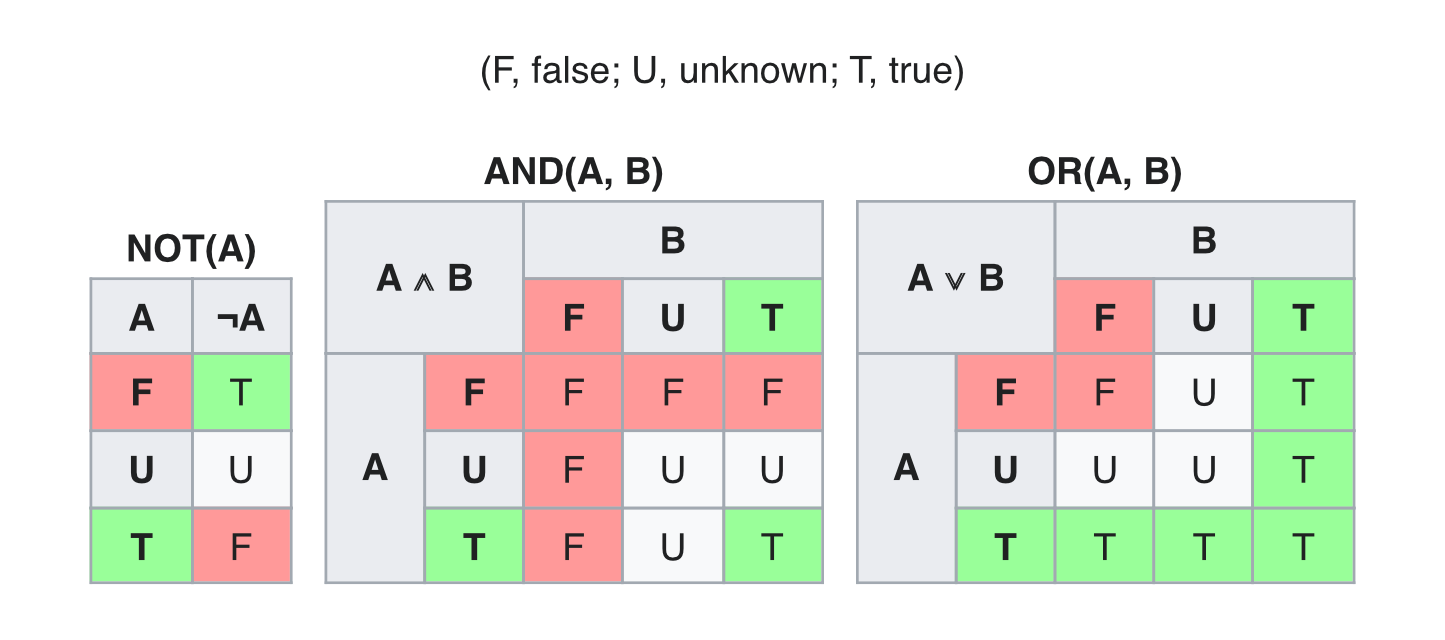
If the requested delay can't be evaluated yet, the expression won't return neither true nor false, it's undefined. In the scope of composite expressions, the outcome follows Kleene logic.
For example, departure delay > 01:00 at origin and arrival delay < 02:00 at destination is undefined until the trains is arrived at destination; on the opposite, departure delay > 01:00 at origin or arrival delay < 02:00 at destination is true if the train is departed with more than 01:00 delay, and not arrived yet.