Scenario details
Holidays
Holidays are dates in the scenario validity period which are treated as set of special days during the creation and management of Operating Calendars. Details on how Holidays are used are written in the Operating Calendar page.
Routing rules
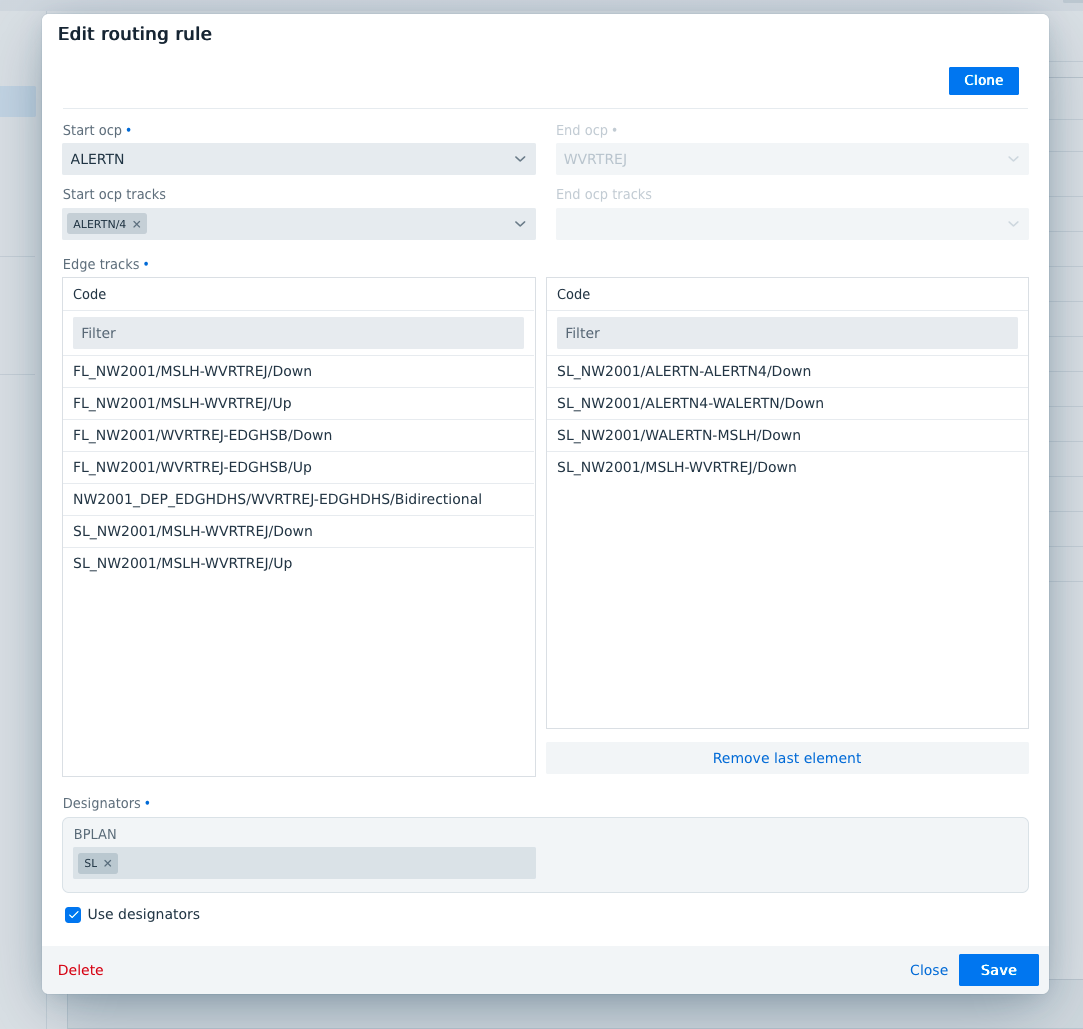
Routing rules are an instrument during import to force the use of a certain combination of Edge tracks in the train editor under specific circumstances. It is a necessary instrument in cases where the timetable to be imported is provided in a format that doesn't correspond to the macroscopic model in trenoLive and ambiguities remain which cannot be resolved automatically by the routing algorithm implemented in the import API. Since the import API is always elaborating all input information, routing rules can only work when they are defined between two adjacent stations in the import format (see example section below). The intermediate OCPs passed by the routing rule - if present- are interpolated in the train editor
Defining a routing rule
The routing rule consists of mandatory and optional filters and the definition of a route, based on the Edge tracks of the macroscopic model.
The mandatory part for the routing rule includes the Start OCP, End OCP (as filters) and the Edge tracks between them. To apply the routing rule only in more specific cases, it is possible to add one or more OCP tracks and a specific designator information (see below). The filters define to which set of trains from the imported file or feed the routing rule is applied. By setting more restrictive filters it can be avoided that trains are rerouted when they shouldn't. If the OCP track filter is left empty, the routing rule is applied to all trains. If the OCP track filter is set to "None", the routing rule is applied only to trains without OCP track information in the input. If the routing rule should be applied to all trains with an OCP track information, but not those without an OCP track information in the input, the OCP track filter should be populated with all OCP tracks.
Using Designators as filter
The designator is an additional filter option which can be left deactivated (recommended for normal use). To use the Designator filter a Register (in Projects) needs to be applied to the routing rules. Then the designators in this can be used as additional filters for the routing rule, for example to respect a specific line information in the import file. The Designator filter should not be activated without previous consultation with TRENOlab, because the Register needs to be linked to the import API adapter for certain formats to work correctly.
Example use case during CIF import (UK)
To use routing rules in the CIF, PIF or PEX import the BPLAN register needs to be applied to routing rules. Then a routing rules is defined as follows:
The following three trains in CIF format are imported:
BSNG384692605192609110111100 PXX1F904034122345001 DMU197 100      S S          P
BX         AWY
LOCHST    0542 05427A        TB
LIMIKLTRF           0546 00000000
LIHELSBY  0550H0551H     055105512        T
LIFRDSHM  0555 0556      055505562        T
LIFRDSHMJ           0558H00000000
LIHALTONJ           0602H00000000                     1
LIRUNCORN 0605H0609      060806092        T
LIDITTON            0611H00000000   FL
LISPEKEJ            0615 00000000   SL
LIALERTN  0617 0620      061706204        T
LIWVRTREJ           0625 00000000   FL
LIEDGHSB            0626H00000000
LIEDGH              0627 000000004
LILVRPLCS           0628 00000000
LTLVRPLSH 0631 06338     TF
The result for each train:
Service Codes
Service Codes are elements associated to path segments in the train editor. They can be defined according to the user's need without any restrictions. They have two main use cases, described in more details here.
TOCs
Train Operating Companies (TOC), or Railway Undertakings (RU), are defined on scenario level.
Train status
The train status is associated to each train in the timetable. Details on the train status and how it is used, are written in this detailed page. Three train status are always present:
- DRAFT
- EXTERNAL
- FINAL
Train categories
Train categories are defined on scenario level.